Statutory inspections
Runs onWindSolarStorage
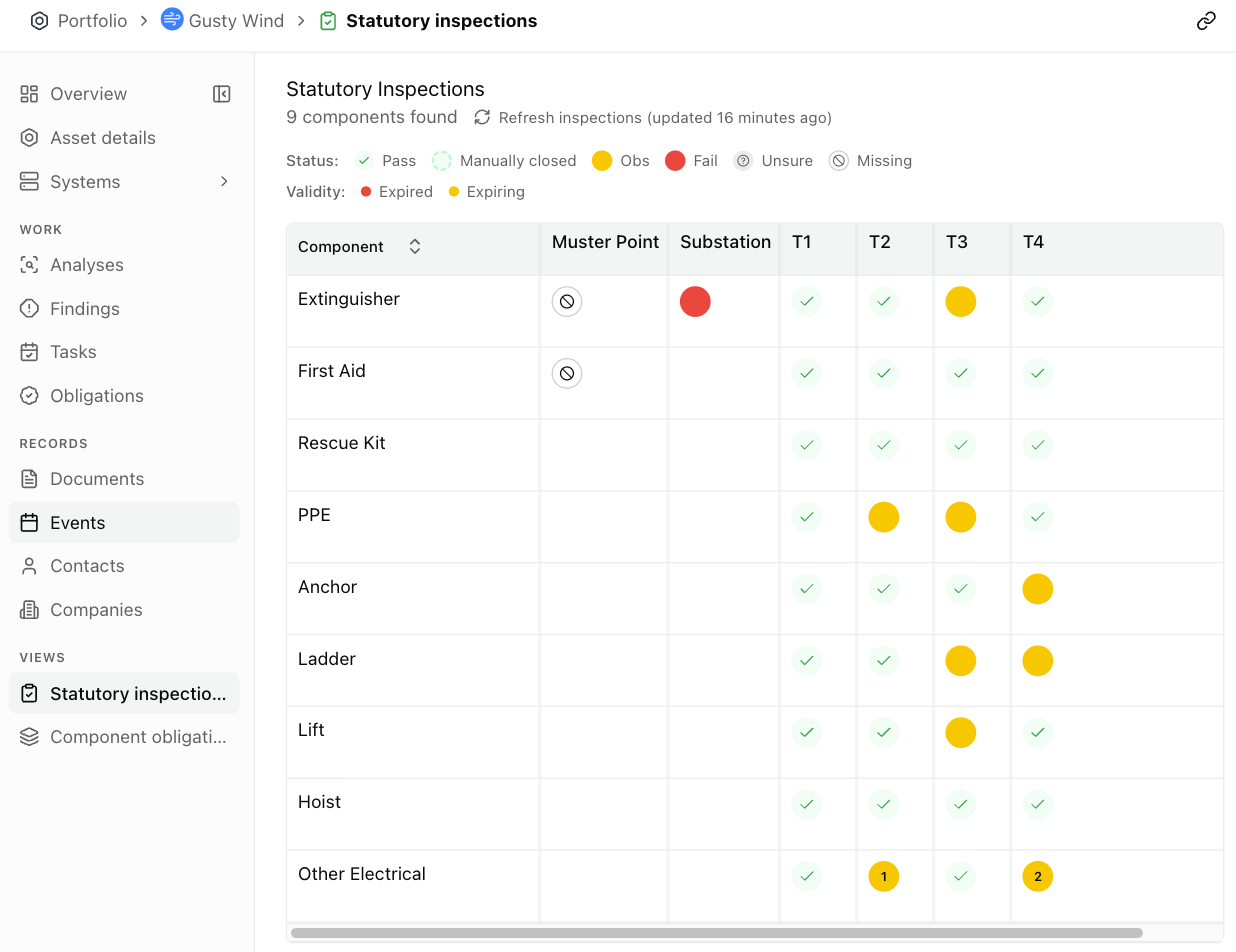
Statutory inspections is a grid on each asset: one row per safety part, one column per system, one mark in every cell. It answers what’s expiring, what’s compliant, and what an inspection flagged that’s not yet addressed. Every answer comes from the inspection reports you already hold.
Anatomy
Section titled “Anatomy”The grid is on the asset: while the asset is open, it’s the Statutory inspections row under Views in the sidebar. Rows are the safety parts, listed once each under Component with a count above the table. Columns are the asset’s systems, sorted by name. Which parts appear follows the asset. Aevy maps components to its systems when you set up the asset, so a site tracks what it actually has rather than a fixed checklist.
Every mark comes from a report synced from your source and that Aevy classified as a statutory inspection.
Read a cell
Section titled “Read a cell”A cell is one circle for one part on one system. Its color is the outcome, and its center shows the count of findings still open. Its edge says whether a person or the paperwork closed it, and the dot on its corner is the expiry.
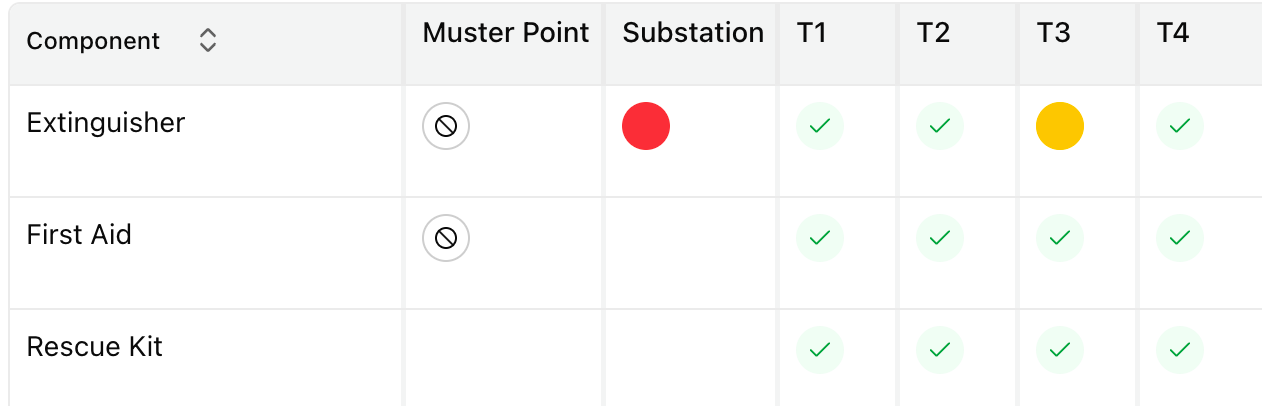
- Green, with a check. Pass. The check means there is a report behind it you can open.
- Orange. Obs: passed with observations. The part stays in service, and the observations are worth clearing.
- Red. Fail. Don’t use the part until you deal with the fault.
- Grey, with a question mark. Unsure: Aevy read the report and couldn’t conclude from it.
- A crossed circle. Missing: nothing on file covers this part on this system, which leaves no evidence to trace back to.
- Empty. The part isn’t on that system at all, which is why the rescue kit is blank under the muster point. There’s no obligation there, and the grid draws nothing.
Two more marks can appear on these. A circle holding a number has that many findings still open. A green circle drawn with a dashed edge is Manually closed: the report said one thing and the findings against it now say another.
Two sources decide a cell’s color, in a fixed order. Aevy reads a status for each part out of the report, then looks at the findings standing against that same part on that same system.
| Mark | When it’s drawn |
|---|---|
| Pass | Findings exist, and all of them are complete or canceled, or none exist and the report concluded pass. |
| Obs | Findings are still open, and none is high or urgent severity. |
| Fail | At least one open finding is high or urgent severity. |
| Unsure | No findings exist, and the report couldn’t conclude. |
| Missing | No findings and no inspection status: nothing on file reports this part on this system. |
Where the two disagree, the findings win, and the dashed edge says so. Hovering a dashed green cell reads Findings resolved manually, against Findings resolved via report for one the paperwork closed. The distinction matters at audit time, where the question isn’t only whether a part is compliant but which document proves it.
Read the grid in order
Section titled “Read the grid in order”Read the grid in this order. Each question only means something once you settle the one before it.
| Step | Ask | Look for |
|---|---|---|
| 1 Coverage | Has everything been inspected? | crossed and grey circles. No evidence is a worse position than a bad result: follow up on these before reading anything else. |
| 2 Dates | Is everything in date? | The dot on a cell’s corner: orange expires within 30 days, red has expired. Both are a booking to make. |
| 3 Outcomes | What was found? | red first, orange after. Keep red parts out of service until you deal with the fault. Keep orange ones in service, with observations to clear. |
| 4 Resolution | Has it been addressed? | The number inside a circle is how many findings are still open on that part. Click it to work them. |
Aevy answers unsure whenever it can’t determine the outcome from the document, which is a prompt to open the report yourself. Unsure ranks as the worst outcome of the set rather than a middling one. That keeps it from being averaged out when parts roll up to their system.
Step 2 counts from the inspection date on the report. It’s six months for a lift, twelve months for every other part, with the dot turning orange inside 30 days of expiry. Hover a cell to read the date itself.
Dates and outcomes are independent, which is why they’re separate steps. A part can hold a clean pass on an inspection that lapsed last month, which draws as a red dot on a green circle. That’s a booking to make, not a repair.
Open the findings behind a cell
Section titled “Open the findings behind a cell”Every mark traces back, and clicking the cell is how you follow it. You first see a defect in a report as a suggestion naming the document and the page it came from. Accepting it writes a finding against the part and the system, with its own severity, owner, and status. Closing the repair is then what turns the circle green.
- One finding. The cell opens it, and the finding links to the report it came from: the evidence is one more click away. A finding that’s already resolved opens the same way, which is how a green cell still shows its history.
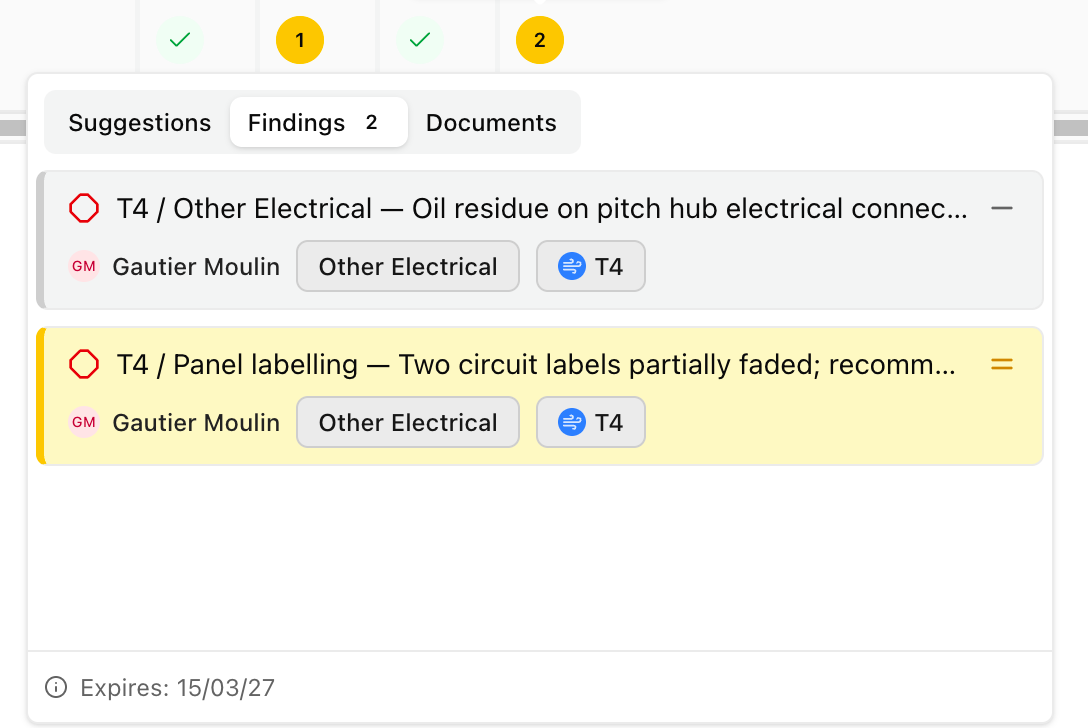
- Several findings. A panel opens over the cell with three tabs: Suggestions, Findings, and Documents. Suggestions holds what Aevy has proposed and you haven’t accepted, Findings is the work itself, and Documents holds the reports behind this part.
- No findings. The cell opens the inspection report itself, at the passage Aevy read the status from.
Refresh the grid
Section titled “Refresh the grid”The statuses reach this table through a view that a scheduled job rebuilds. That means a report processed minutes ago isn’t in the grid yet. Refresh inspections above the table shows when the view was last built, and pressing it rebuilds the view now.
The button reads Refreshing while one runs, including one the schedule started. Expect a couple of minutes after new documents sync: Aevy reads and classifies them first, before a rebuild has anything new to pick up. Press it twice and Aevy says a refresh is already running rather than queueing a second.
Countries covered
Section titled “Countries covered”What counts as a statutory inspection, how often it is owed, and what a certificate has to say are all set by national regulation, so the workflow is built per country rather than once.
| Status | Countries |
|---|---|
| Supported | United Kingdom, France, Germany, Spain |
| In development | Other geographies, prioritized by what people ask for |
If your site sits somewhere not on that list, say so to your Aevy contact or in chat. Which country comes next is decided by who asks, so naming yours is what moves it up the list, and the grid still works in the meantime: the marks and the findings behind them do not depend on the regime, only the frequencies and the naming do.
Limits
Section titled “Limits”The grid is only ever as current as the paperwork you hold, and a part nobody has inspected says so rather than being blank.
Where the regime is not yet one of the four above, treat the expiry dot as a prompt rather than as the legal deadline: it counts six months for a lift and twelve for everything else, which is a sensible default rather than your regulator’s rule.
What’s next
Section titled “What’s next”- Systems and components: the same parts under their systems, where each system’s card rolls these statuses up to one mark.
- Findings: the findings behind the marks, alongside the rest of the asset’s open work.
- Documents: the reports the marks came from.