Obligations
An obligation in Aevy is something you must do or hold: a document to keep on file, a report to file on time, an inspection to run, a certificate to renew. The requirement comes from a contract, another agreement, or the regulation your site operates under. Aevy tracks each one on its own cadence and makes a non-compliance visible the moment you miss it.
Obligations is an Asset Management feature. If Browse all in the sidebar doesn’t list it, switch mode from your account menu at the bottom of the sidebar. Obligations went by requirements until July 2026: the records and the page are the same, and old /dashboard/requirements links still resolve, as do old /compliance/ links to this guide.
Anatomy
Section titled “Anatomy”The Obligations page lists your obligations across your assets and tracks each one. The agreement behind one can be a lease or a grid connection as easily as a contract, and a regulation counts along with the permits issued under it.
An obligation isn’t a task. Compare the two side by side under obligations and tasks.
Down the left, obligations belong to groups you control. Groups include All obligations for the whole portfolio, Ungrouped, and named groups such as Contracts & Procurement, Grid & Interconnection, Offtake & Revenue, and Permitting & Consents. Each group has its own overdue count and its own count of waiting suggestions, so you can see where the pressure is before opening anything. New group adds one, and Group by regroups the whole list.
Across the top, a health bar reads the selected group: 56% on track and 45 of 80. The bar splits green, amber, and red for on track, nearing due, and overdue.
The tabs separate Active obligations from Drafts and Archived, and Suggestions contains what Aevy has proposed and you haven’t yet reviewed. Search obligations matches on the title, and the filter bar works as it does everywhere else.
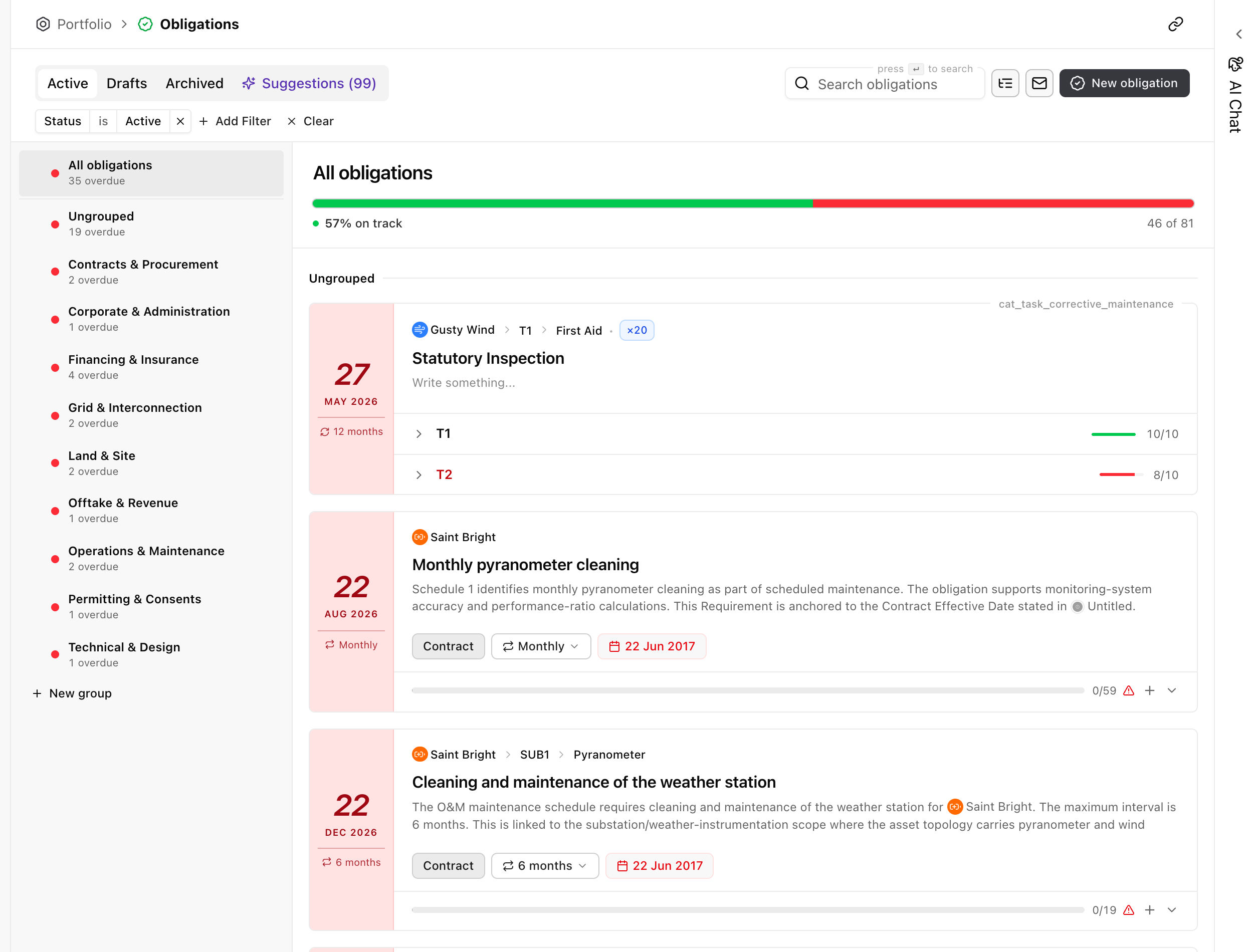
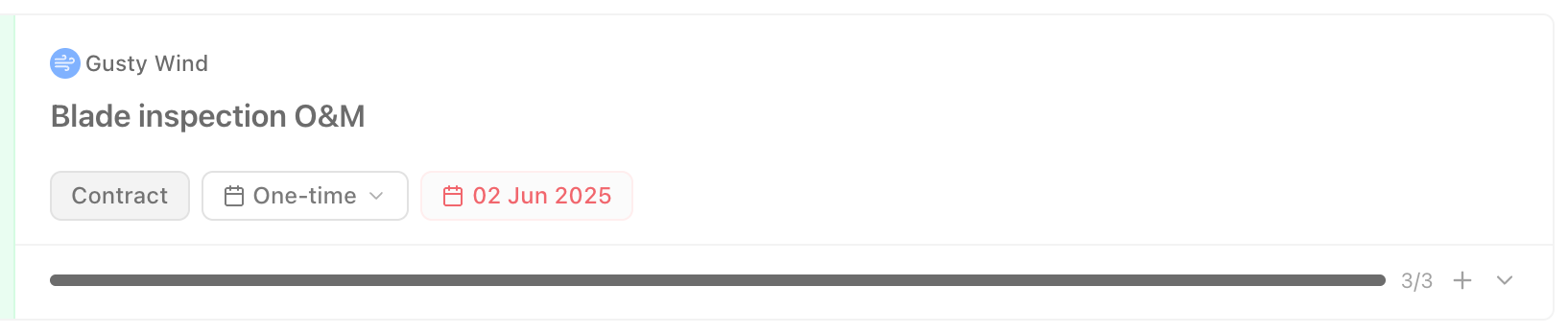
Each obligation is a card. It names the asset it belongs to and what it requires, and around that it shows the three things you check at a glance:
 123
- The asset and what it requires. Which site the obligation belongs to, and the duty in a line: here a blade inspection required by the O&M contract.
- Where it comes from, how often, and when. The source category is Contract, the cadence is One-time, and there’s a due date. A recurring obligation shows the schedule its contract sets instead, and repeats on it.
- Fulfillment. A bar with a count of the work that satisfies it. 3/3 means every task is complete and the obligation is met. A short count means it’s not, which is a non-compliance.
When an obligation isn’t met, it stands out. The card shows a warning, the item counts toward the overdue total on its group, and it pulls the on-track health bar down.
Obligations and tasks
Section titled “Obligations and tasks”An obligation is a standing rule. A task is one dated piece of work. The rule outlives any single cycle: it says what you must do, how often it comes round, and which steps count as doing it. The tasks are what that rule turns into on the calendar, one set per cycle, each with its own due date, assignee, and status.
| Obligation | Task | |
|---|---|---|
| What it is | A standing duty, set by a contract, another agreement, or a regulation. | One dated piece of work. |
| How long it lasts | As long as the agreement or rule behind it stands, cycle after cycle. | One cycle, then it closes. |
| Where it comes from | Extracted from a contract, agreement, or regulation and accepted by you, or set up by hand. | Created by an obligation, accepted from a suggestion, raised alongside a finding, or created by you. |
| Its date | A cadence, and a next due date it recomputes each cycle. | One due date that doesn’t move on its own. |
| Done means | The cycle’s required work is complete, and Aevy schedules the next cycle. | This piece of work is complete. |
| Missing it | A non-compliance, counted on its group and in the health bar. | An overdue task on the Tasks list. |
| Where you work with it | The Obligations page and the asset’s Obligations tab. | The Tasks page, the asset, and your own list. |
How a cycle produces tasks
Section titled “How a cycle produces tasks”An obligation has two things a task doesn’t: a cadence and a set of steps. The cadence is one of four shapes, chosen when you set up the obligation. A Fixed schedule recurs on the calendar, at an interval counted from an anchor date. That’s what an annual report or a certificate renewal needs. A Rolling interval counts from the last completion instead, so an inspection due every six months means six months after the one you actually ran. One-time is a single due date with nothing after it, and Multiple dates takes a list of specific dates where a contract names them.
The steps are the work each cycle needs. Aevy creates them as tasks on the asset ahead of the due date, by a lead time set on the obligation. That way the work is in your list before it’s due rather than on the day. Complete the required ones and the cycle closes: the obligation records the completion and works out the next due date from its cadence. Its card shows this as a fulfillment count, the tasks done against the tasks the cycle requires.
Where the two meet
Section titled “Where the two meet”Most tasks have no obligation behind them, and that’s the normal case: something needs doing on a date, so you create it. What links them is the other direction. An open task offers Link to obligation, which files it as work that counts toward one of the asset’s obligations. A linked task names the obligation and links straight through to it. Unlinking leaves the task in place and only breaks the connection.
The distinction that matters in daily use: changing a task changes one piece of work, while changing an obligation changes every cycle still to come. Push one task’s due date and only that task moves. Change the obligation’s cadence and the next due date, and every cycle after it, follows the new rule.
Add an obligation
Section titled “Add an obligation”Obligations come from two sources, and most portfolios use both.
- Read from your documents. Aevy extracts obligations from what it already holds. That includes the contracts you signed and other agreements, such as leases, grid connection terms, and offtake. It also includes the permits and regulatory conditions your site operates under. Each appears as a suggestion naming the document and clause it came from.
- Set up by hand. Anything Aevy has no document for, you add directly, with the same cadence and steps. Examples: an internal policy, a commitment made in a meeting, a duty that lives in a regulation nobody filed a copy of.
Either way the record is the same afterwards, and it has its own cadence. Aevy tracks a one-off deliverable once, while a recurring duty, such as an annual report or a periodic inspection, repeats on its own schedule.
Review a suggested obligation
Section titled “Review a suggested obligation”Obligations Aevy proposes appear under the Suggestions tab, with the count of what’s waiting on the tab itself. The status tabs beside it hold obligations you already track. Your groups down the left still apply, and each group has its own suggestion count.
A suggested obligation reads as a card in the same shape as a real one, tinted so it reads as a draft. It has Why? for the reasoning, plus Dismiss and Accept. Each names the document it came from, so you can check the clause before you commit. A suggestion missing part of its cadence shows that chip in red, for example Date needed where the anchor date is missing. Accept stays unavailable until you set it on the card, and Accept as draft, in the menu beside it, files the obligation under Drafts to finish later. Accept all at the top takes a whole group in one decision when a single contract produced many. See the suggestions guide for the review loop in full.
An asset with no obligations yet but a queue waiting opens on Suggestions rather than on an empty list.
Limits
Section titled “Limits”Aevy writes nothing until you accept it, so a proposal waiting under Suggestions isn’t yet an obligation it tracks. Repeating work that nothing requires of you doesn’t need an obligation at all: give the task its own recurrence instead.
What’s next
Section titled “What’s next”- Documents: the contracts and permits Aevy reads an obligation out of.
- Suggestions: the review loop that turns a proposal into a tracked obligation.
- Tasks: the dated work each cycle produces.
- Asset overview: its Obligations tab shows the same list scoped to one site.