How your data gets in
Documents enter Aevy through a read-only sync that mirrors the SharePoint sites your administrator grants. There’s no upload step. Changes appear within about ten minutes, and a nightly pass reconciles the whole picture. Aevy reads, classifies, and tracks each document through processing the moment it syncs to its asset.
Anatomy
Section titled “Anatomy”Your source stays the single home of the files, and Aevy mirrors it. The folder tree on the Documents page is your source structure, the files are your files, and the Recent uploads quick action means recently synced. When a file type has no in-app preview, the document page offers Open in SharePoint: the original is always there.
What happens to a copy once it’s here is in information security. That covers which region hosts it, who can reach it, and how Aevy returns or destroys it.
The sync runs on two rhythms, and treats each kind of change at the source in its own way:
- Changes, about every ten minutes. Aevy asks your source for what changed since the last pass, such as new files, edits, renames, moves, or deletes, and processes only that. A file you drop in SharePoint is normally in Aevy within minutes.
- Everything, once a night. A nightly full pass reconciles the whole picture, so nothing drifts even if the sync misses an individual change.
- Renames and moves are updates. Aevy tracks each file by its source identity, not its name or path. Renaming or moving a file updates the record instead of creating a duplicate, and its history stays attached.
- Deletes are marked, not erased. When a file is deleted at the source, Aevy marks it deleted here, and it drops out of your views. The record survives for the audit trail.
- Archives unpack themselves. Aevy extracts a
zip,rar,7z, ortararchive and processes its contents as ordinary files. Deleting the archive at the source removes its contents here too.
Depth of reading differs by format. PDFs get the full treatment: optical character recognition (OCR), classification, and fact extraction with source lineage. Other formats get a lighter pass: a readable preview and a summary. Formats with no preview keep the Open in SharePoint link.
Grant access to a site
Section titled “Grant access to a site”Connecting a source is a one-time job for your Microsoft administrator, and the connecting SharePoint guide is the one they follow. The Aevy app’s standing permission is Sites.Selected, which by itself grants access to nothing. Your administrator then grants read-only access site by site, so Aevy can read exactly the sites you chose and nothing else. Revoking works the same way: remove a site’s permission in the Azure portal and Aevy loses it.
After setup, your Aevy contact confirms the connection is active, typically within one business day, and the first sync brings the sites’ history across.
Watch processing
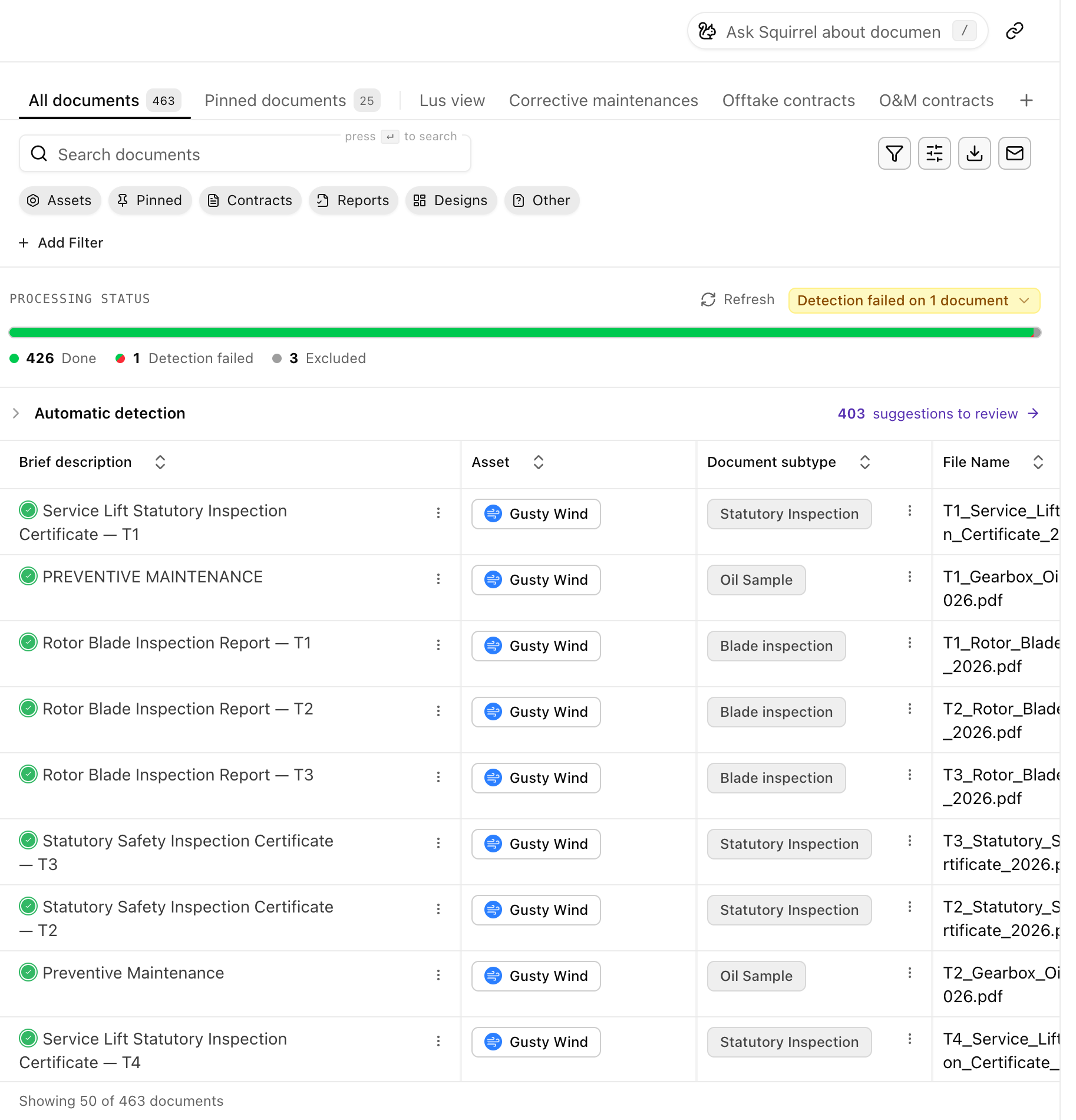
Section titled “Watch processing”Every document has a status from arrival to done, and the Documents page shows it as a chip. Most settle on Success. A spinning icon means Aevy is still reading it, running optical character recognition (OCR) or extraction. A document Aevy has read but not yet checked for records shows Queued for detection or Detecting records until detection finishes. The rare problem states name their cause exactly, such as Source password protected error or Corrupt. The documents guide reads the statuses in detail, including Superseded and Duplicate.
Per asset, the Processing status card at the top of the asset’s Overview is the quickest health check. It shows the same bar as the Documents page for that asset’s PDFs only: how many are done, queued, still processing, or need attention. The badge beside it names the worse of the sync and the processing, such as Sync failed 2h 56m ago, 2 files not synced, or Done processing. Click the badge to see the detail: the assets not fully synced, any with no new documents in over 20 days, and what Aevy has left to process.

An asset’s sync status says when it last synced, and changes color when a sync falls behind or goes wrong:
- A failed sync turns red and reads “Data room sync failed”, with when it failed and when the last successful sync was. Hover it for the reason and the folders the asset syncs from. When Aevy has lost access to a folder, the line says so, because that is the one failure whoever manages your source can fix.
- A late sync turns orange after 20 minutes with no sync. The next sync normally catches up.
- An overdue sync turns red and reads “Data room sync is overdue” after 30 minutes with no sync. Changes normally sync every ten minutes.
- A sync that is turned off is grey and reads “Data room sync is turned off.”
- Files that didn’t sync show in amber with their count. Aevy retries them with a full sync an hour later, up to four times a day, and after that with the nightly pass.
- Empty files are skipped, not failed. A file that is empty in SharePoint keeps the line green, and the sync’s file list marks it Empty in the data room, not synced.
- No new documents shows in amber when a sync runs but nothing has arrived for over 20 days. If files should be arriving, check the folders it syncs from.
When an asset goes four hours without a completed sync, a banner across the top of the asset’s pages says so, and it clears once a sync completes.
If you can manage an asset’s sync, Refresh on its Processing status card starts a sync now instead of waiting for the next one. For everyone else, it refreshes the list.
Limits
Section titled “Limits”There is no upload button anywhere in the platform. The mirror runs one way: Aevy holds read-only access to each granted site and never writes, moves, or deletes anything at your source. A site nobody granted stays invisible here, which is the usual reason a document someone expected is missing.
What’s next
Section titled “What’s next”- Documents: the folder tree, the columns, and every processing status in full.
- Suggestions: what Aevy drafts from a document once it has read it.
- Lineage: the facts it extracts, each with the source line behind it.
- Information security: how Aevy holds a copy, and who can reach it.