Contacts and companies
Contacts in Aevy are the people around an asset: the turbine service lead, the landowner, the grid operator’s engineer, the mayor. Companies are the organizations they work for. Both are on the Contacts page, each one linked to the assets it touches.
Contacts is an Asset Management feature. If Browse all in the sidebar doesn’t list it, switch mode from your account menu at the bottom of the sidebar.
Anatomy
Section titled “Anatomy”The page has two tabs over the same directory: People for individuals and Companies for organizations. Each is an ordinary Aevy table, which means the filter bar, saved views, and columns work exactly as they do on documents or tasks. An asset has the same two tabs, scoped to that asset, when you want the people for one site rather than the whole portfolio.
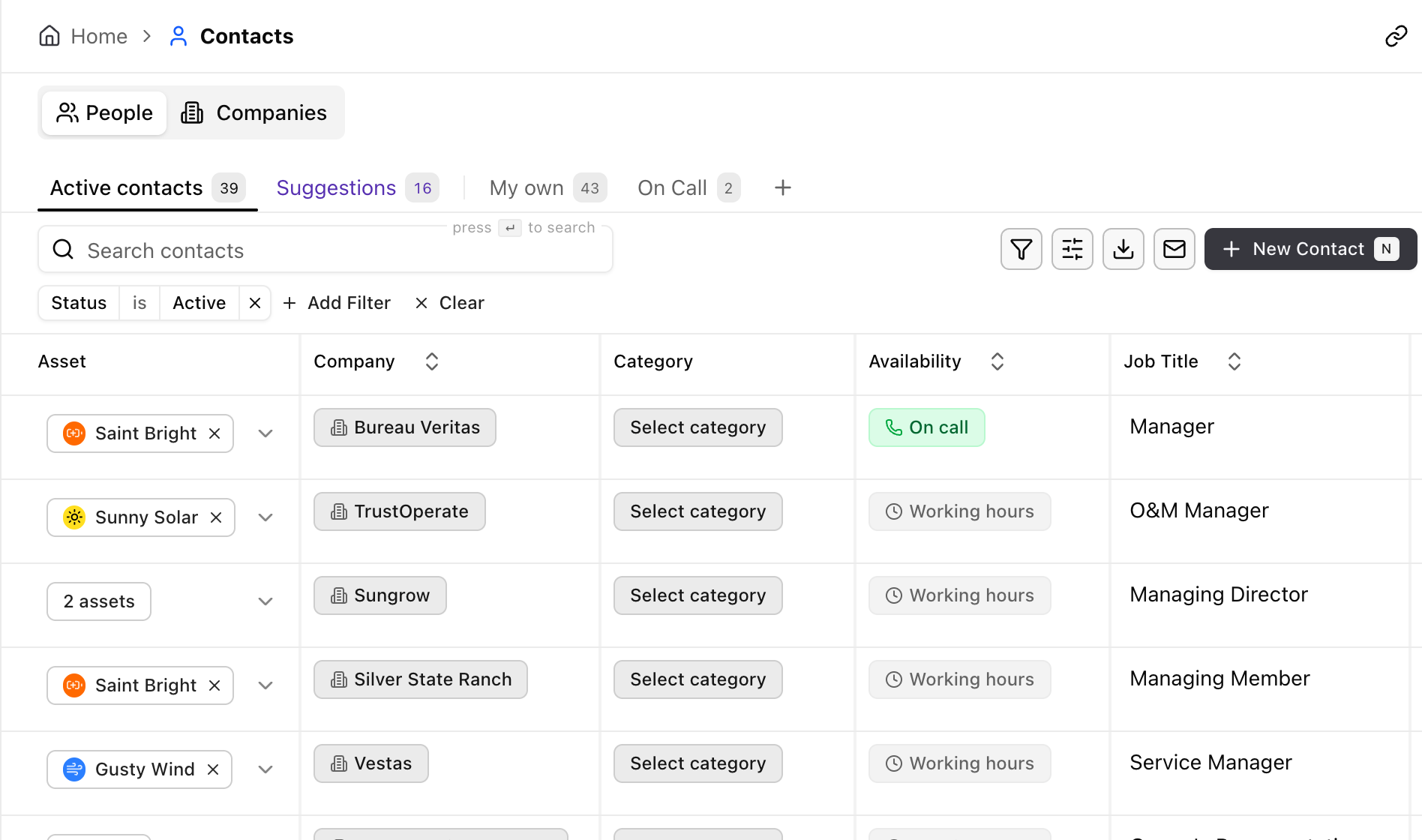
The People table opens with almost every column showing: name, email, the three phone numbers, job title, notes, company, category, availability, and the asset. The Companies table opens on company name, industry, email, phone, website, and assets.
Find a person or a company
Section titled “Find a person or a company”Ways to find a person or a company, roughly fastest first:
- Search. Search contacts and Search companies match on the text in the row.
- Saved views. The tabs along the top of the table start at Active contacts and Active companies, which leave out inactive records. A view such as On call is a saved view like any other, and you can star it into Favorites.
- Filter. Narrow by company, category, availability, status, or asset. The filtering guide covers the operators.
- From the asset. The Contacts tab on an asset shows only that asset’s people and companies.
Open a contact or a company
Section titled “Open a contact or a company”Click a row to open the contact, either in the drawer or on its own page. The most important fields:
- Category. What this person is to you, from a fixed list. Choose from Turbine O&M, Substation O&M, DNO (grid operator), Landowner, Electricity buyer, On site contact, Regulatory Authority, and 6 more.
- Availability. On call or Working hours, which is the difference between a number you may ring at 02:00 and one you may not.
- Company. Links the person to their organization. Set it, and the contact takes the company’s assets. Leave it empty, and you pick the assets directly.
- Contact details. Email, plus separate work, mobile, and emergency phone numbers, and an address.
- Status. Active or Inactive. When a person leaves the O&M provider, mark them inactive instead of deleting them: the records that reference them keep their history.
- Notes. Free text for the things a form has no field for.
A company record is the organization. It includes the name and legal name, industry, website, phone and email, address, tax and registration numbers, a description, and the assets it works on. Its people are the contacts that point at it.
Every contact and company also includes the activity log, so a changed phone number has a trail.
Add a contact or a company
Section titled “Add a contact or a company”Contacts and companies are either created by you or proposed by Aevy:
- You create them. New Contact and New Company open a draft immediately. Create contact and Create company commit it, and cancelling discards the draft.
- Aevy proposes them. Reading a contract, Aevy finds the parties and the people signing for them and drafts a suggestion to create the contact. Aevy writes nothing until you accept it. If a proposal matches an existing email or an existing name at the same company, Aevy recognizes it as the same person, not a duplicate.
Export or send a list
Section titled “Export or send a list”Both tables have Export and Send, which take the rows in view, filters included, to a spreadsheet, or email that spreadsheet to someone. Duplicating a record copies it as a starting point for a similar one.
Limits
Section titled “Limits”Contacts aren’t user accounts. A colleague who logs in to Aevy is a user, and work gets assigned to them. A contact is a record about someone, usually outside your company, who you need to reach.
A company has no role field. The categories on its contacts show what an organization does for you. The same company can be the O&M provider on one asset and the engineering, procurement, and construction (EPC) contractor on another. One label on the company would have to be wrong somewhere.
There’s no merge: to resolve two records for one person, edit one and mark the other inactive.
What’s next
Section titled “What’s next”- Tasks: the External contact field names who to call, separately from the colleague assigned.
- Findings and events: who reported the defect or what happened on site, and which company is responsible.
- Mentions: type @ in a comment to name a contact or a company, and the reference becomes a link.
- Squirrel: ask who the landowners are on an asset, and the answer comes from these records.