Activity log and comments
Most records in Aevy have an activity log. It’s a running history of what happened to them, newest first, each entry naming who did what and when. Comments appear at the top of the same feed, so the discussion is next to the history. When Aevy itself acts, the log records it like anyone else’s action.
Anatomy
Section titled “Anatomy”The Activity section holds the feed: the comment box on top, the history beneath it. You can see how a task, a finding, or a document reached its current state, and talk about it in place.
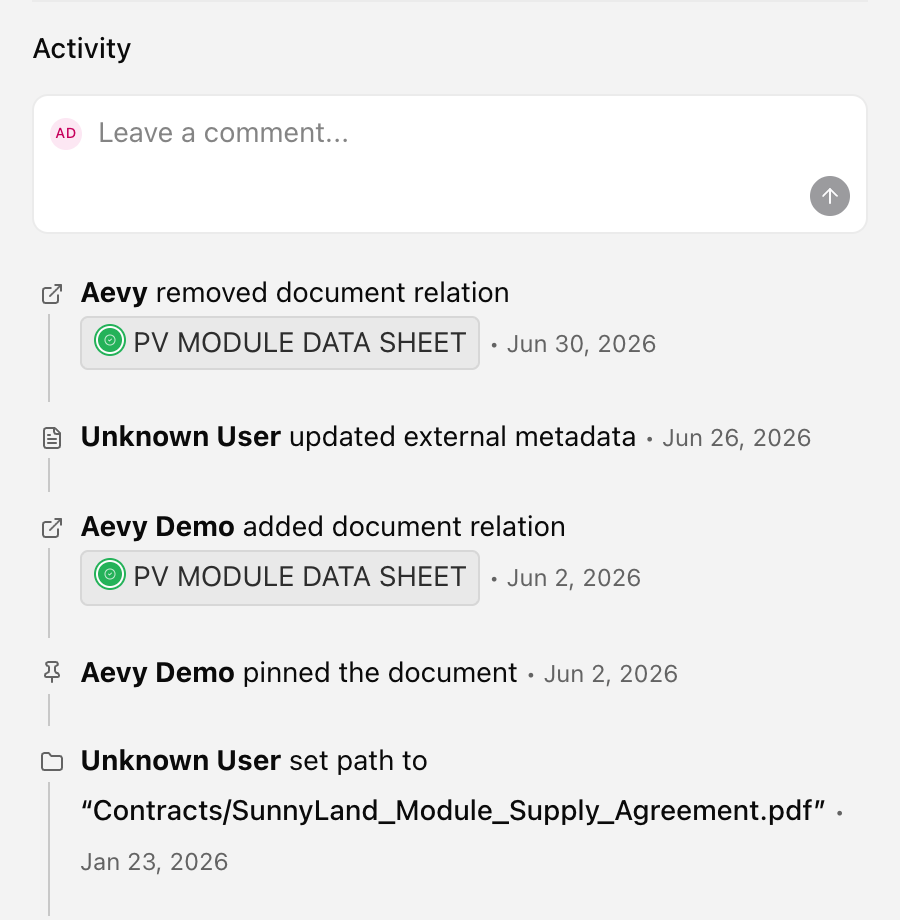
The same Activity section appears across the platform and works the same wherever you are. You find it on:
- Tasks, findings, and events. The work items.
- Systems, and contacts and companies.
- Documents and obligations.
- An asset’s details, and inside the quick-view drawer you open from any table row.
Consecutive changes fold into one row, such as 3 updates with the time of the newest. Comments never fold, and they stand out between those rows. Click a folded row to expand it. Show all activity at the foot of the feed expands all folded rows and shows older entries.
The feed records:
- Creates and deletes. created the task, deleted the system.
- Field changes. set financial year start to …, or changed status from … to …, with a status shown as its coloured badge.
- Assignments and links to documents and other records.
- Aevy’s own actions. Accepting a suggestion, extracting a fact, posting a comment.
Write a comment
Section titled “Write a comment”Write a comment in the box at the top of the feed. Comments are rich text and take @ mentions, so you can point at a record or bring in a teammate. You can reply to a comment, react to one with a thumbs up, an eye, or a hundred, and edit or delete your own. Mention a colleague to loop them in, or mention Squirrel to ask it to act on the record.
Get notified of changes
Section titled “Get notified of changes”Writing a comment subscribes you to that thread, so you receive replies to it without asking. Drop the subscription from the thread’s Watch thread control.
Use Notify me on a record to subscribe to its updates, and choose which kinds of change you receive. For example, a status change, an assignment, or a new comment.
Limits
Section titled “Limits”Not every record has an activity log: the feed appears on the records in that list. Subscriptions are narrow. Writing a comment subscribes you to that one conversation rather than to the record around it, and Notify me is per record.
What’s next
Section titled “What’s next”- Notifications and inbox: where those updates appear, and what you receive by email.
- Mentions: what @ matches when you type it in a comment.
- Suggestions: the drafts Aevy posts, which the log records like any other action.