Suggestions
A suggestion in Aevy is a proposed change to your data, drafted after Aevy reads a document. It might add a component, create a task, or set a property. Every suggestion is a draft: nothing changes until you accept it, and each one names the document and page it came from.
Rules decide which documents Aevy reads and what it proposes from them. Aevy sets these up for you, and defines new ones with you as you need them; there is nothing to configure in the app.
Anatomy
Section titled “Anatomy”Open Suggestions from Browse all in the sidebar. The number next to it is how many are pending review.
Documents come in through the sync from your source, and the flow from there is the same every time:
- A document syncs onto an asset from your source.
- Aevy reads the document and pulls out the facts it can support with evidence.
- Each fact becomes a suggestion, grouped under the document it came from.
- The suggestion stays on the Suggestions screen until you accept or dismiss it.
The screen has two panes:
- Left: the review list. Every pending suggestion, grouped under the document it came from. Each group shows the document title, the asset it belongs to, and how many suggestions it holds.
- Right: the review pane. Select a document group on the left and its suggestions open here in full, with all the supporting detail.
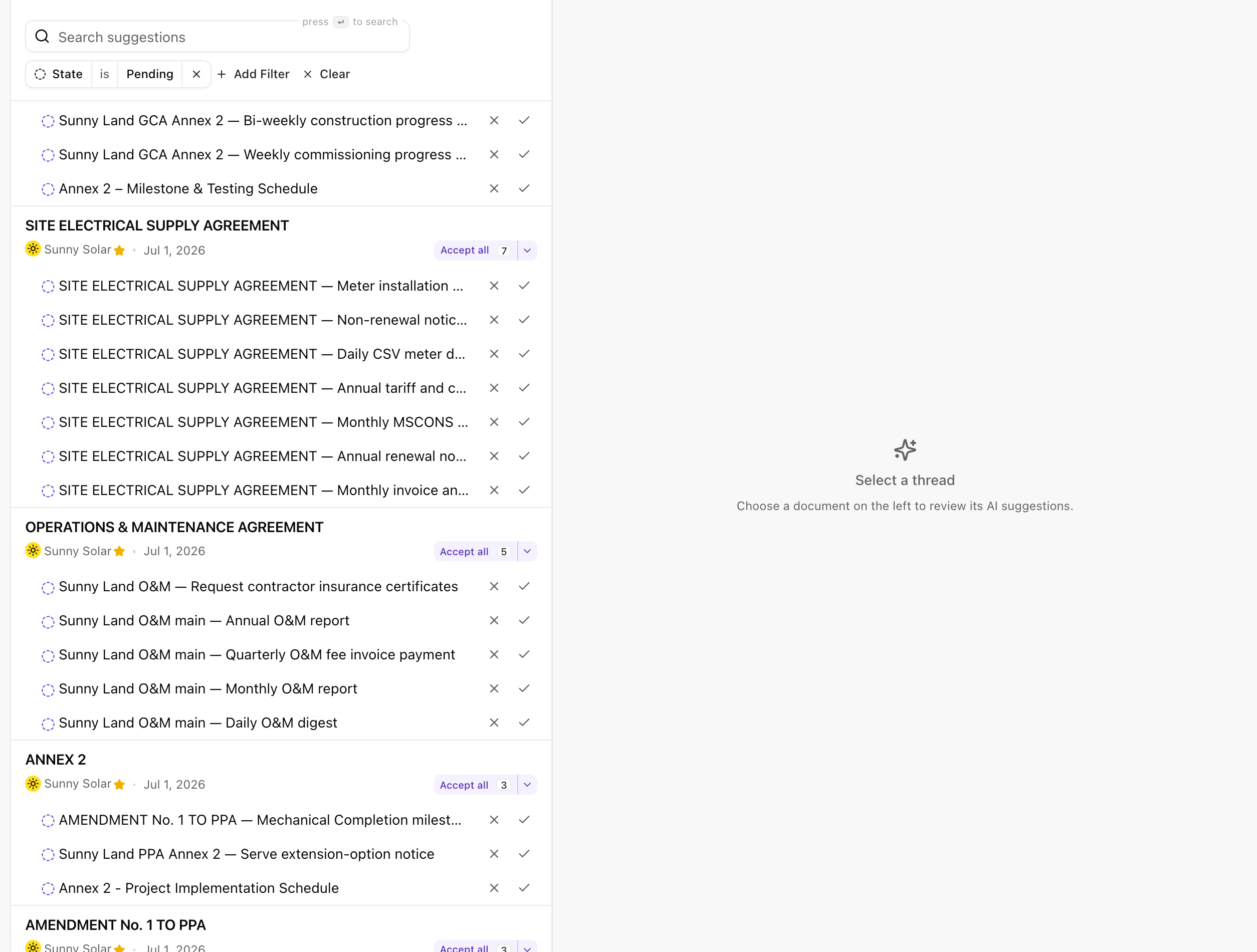
Open a document group and its suggestions fill the review pane, one card each. Here the October 2025 monthly operations and maintenance report for Sunny Solar holds five:
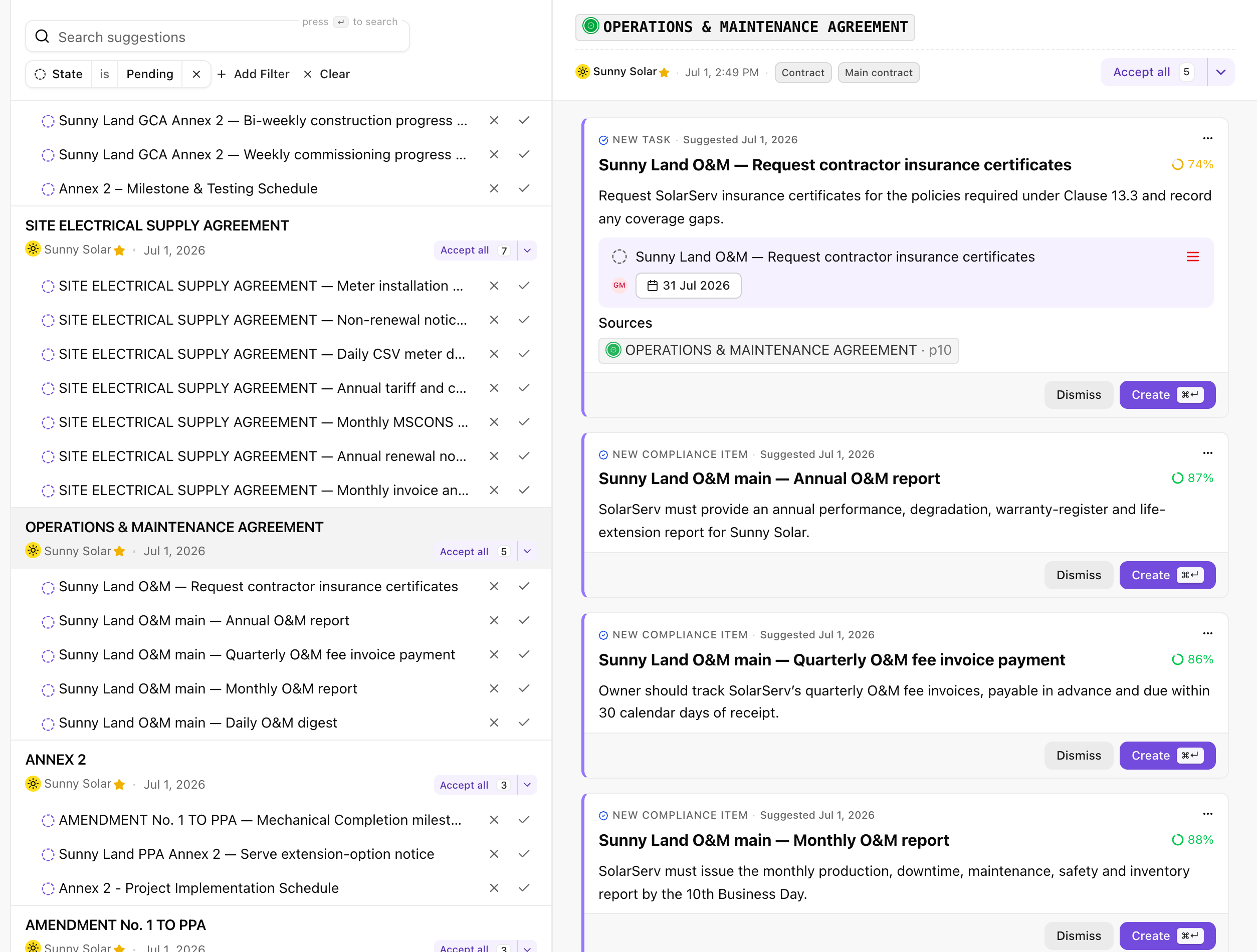
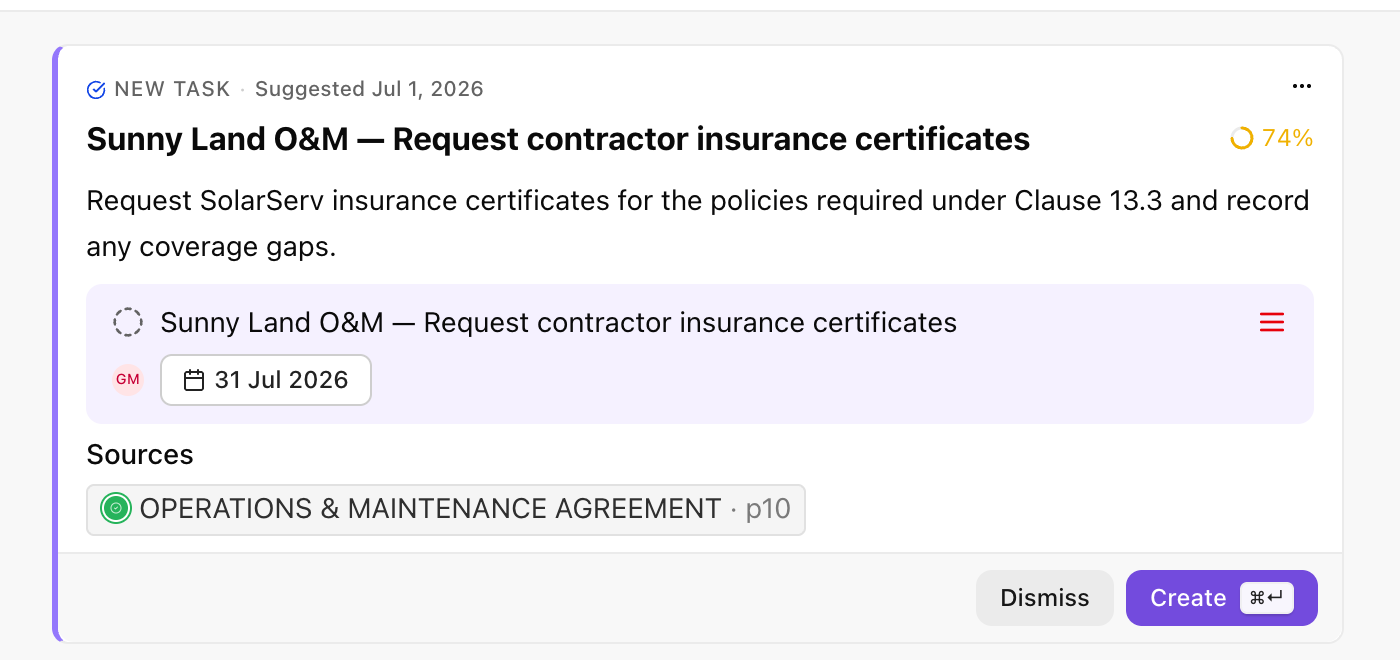 12345
12345- Type. What Aevy proposes to create or change, such as NEW EVENT: a task, an obligation, a finding, a component, an event, or a property update.
- Age and menu. How long ago Aevy read it, and a menu that opens the proposed record in a drawer, where you can correct it before you accept.
- Proposed record. The record itself, drawn the way it appears once accepted. Its fields, such as a due date, an owner, or a value, show before you commit.
- Why? Opens the reasoning: the document and page Aevy read, the confidence it reports, and whether the text it cited is in the source. More on reading this below.
- Decision. Dismiss and Create.
Find your suggestions
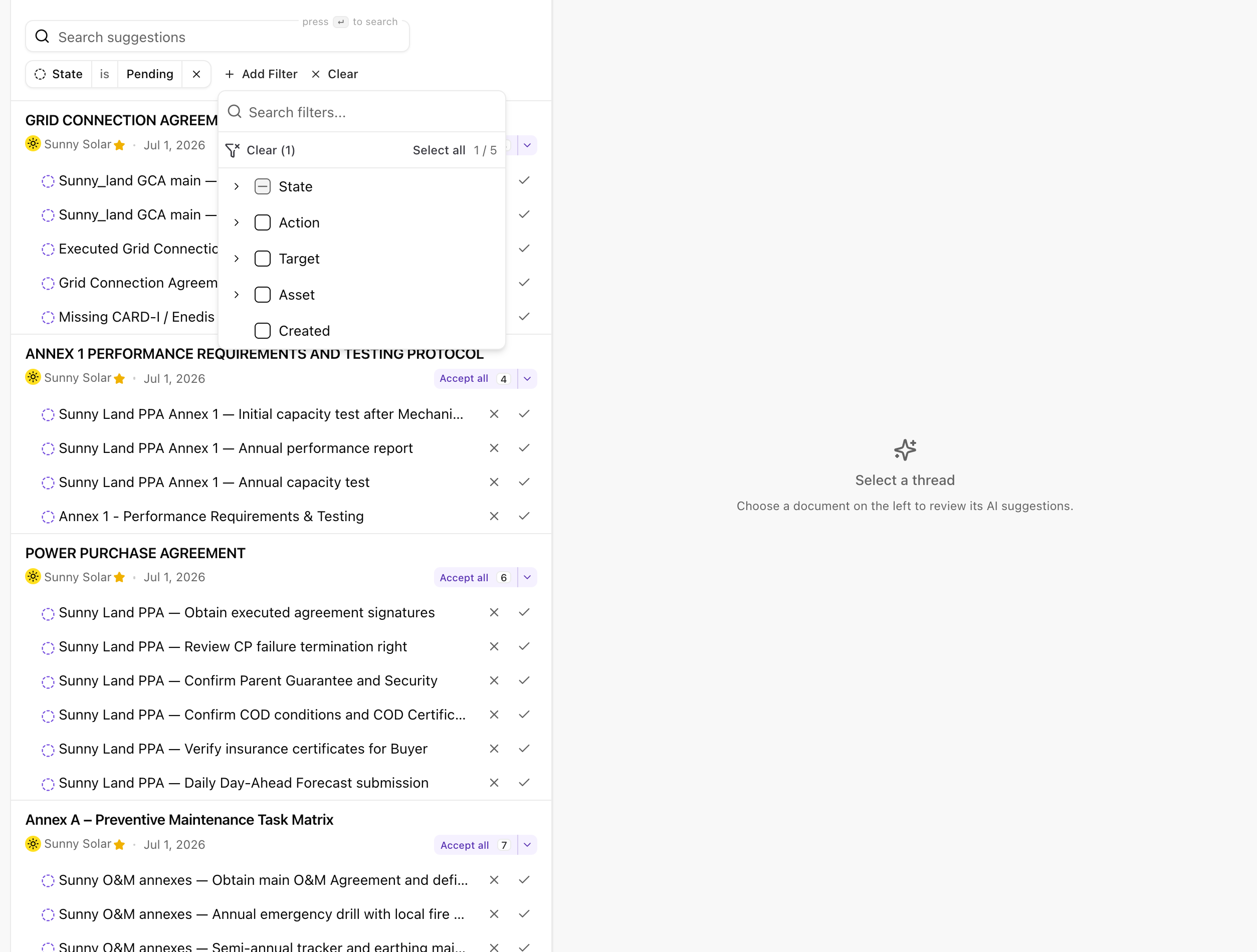
Section titled “Find your suggestions”At the top, a search box and a filter bar help you narrow the list. By default, the list shows only State is Pending, so you see only what still needs a decision. Use Add Filter to narrow further, or Clear to remove filters.
Review a suggestion
Section titled “Review a suggestion”A pending suggestion takes one of three moves: accept, dismiss, or accept the whole document at once.
Accept
Section titled “Accept”Accepting a suggestion writes the change to your asset register. A new component appears on the asset, a property takes its new value, and Aevy records a date.
In the review pane, you accept a suggestion with its Create button. In the list, each row has its own accept control, so you can act on a single item without opening it. A proposed task, finding, event, contact, company, or system also waits under the Suggestions tab of its own list, tinted, with Accept on its row.
Dismiss
Section titled “Dismiss”Dismissing discards the suggestion. Nothing changes, and the suggestion leaves your pending list. Use it when a suggestion is wrong, duplicated, or not worth recording.
In the review pane, this is the Dismiss button. In the list, each row has its own dismiss control alongside accept.
Accept all
Section titled “Accept all”When a document is trustworthy and every suggestion under it looks right, Accept all applies the whole group in one action. The number on the button shows how many suggestions you are accepting.
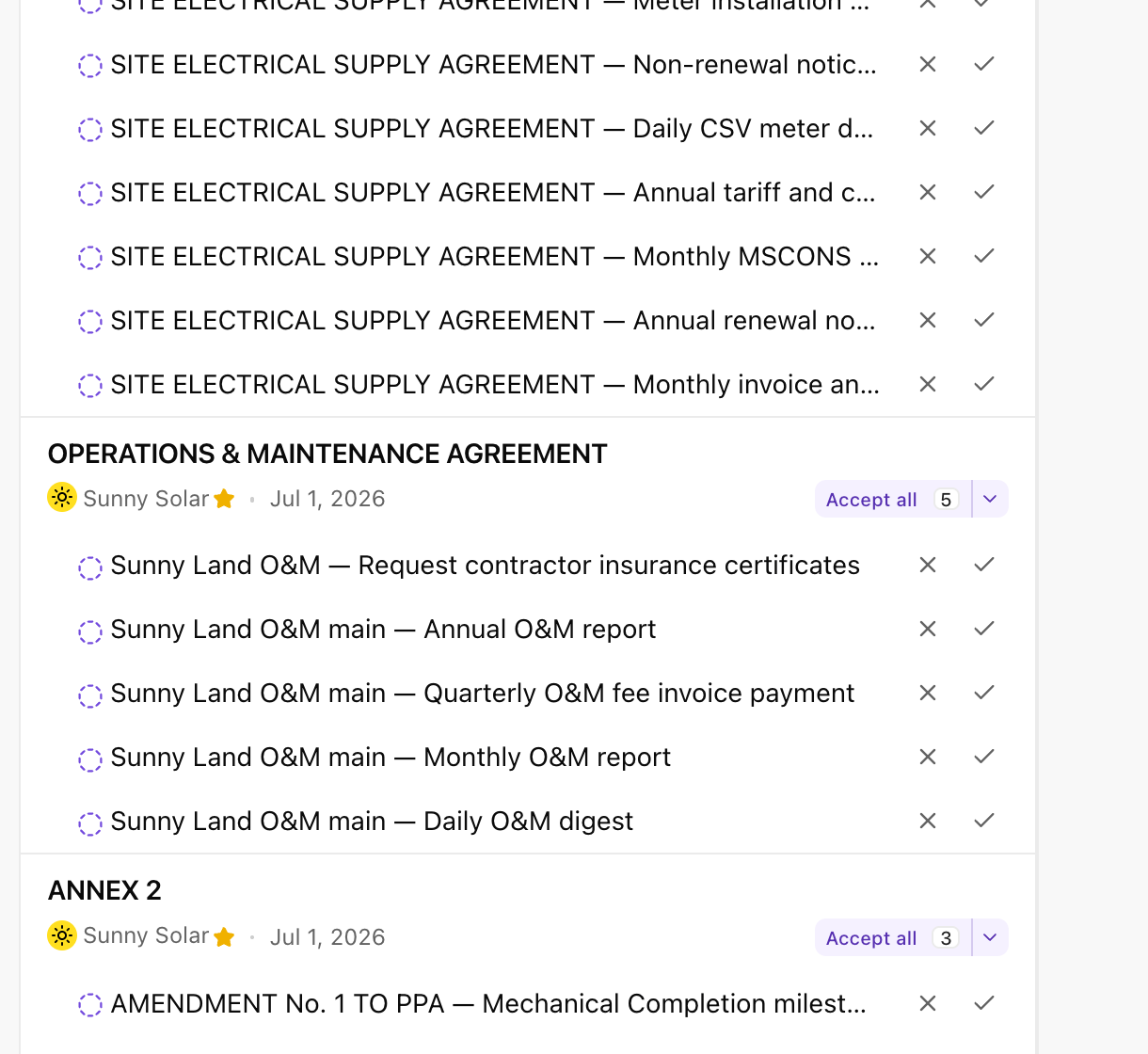
You can accept some items, dismiss others, and leave the rest for later. The list keeps whatever you haven’t yet decided.
Ask Aevy for a suggestion
Section titled “Ask Aevy for a suggestion”To ask Aevy for a value yourself, right-click a field on a record, such as a property in an asset’s details or a task’s due date. The menu opens with a box that reads Ask Aevy to suggest a value…. Type your request, such as where to look or the value itself, and press Enter. The field shimmers while Aevy works. The answer arrives as a pending suggestion on that field, and its reasoning starts with “Requested by” and your name. Nothing changes until you accept it. In a field you’re typing in, right-click opens your browser’s own menu.
To ask about a whole record, right-click a task, event, finding, system, or obligation in a table, or a mention of one. Its menu starts with Ask Aevy to change this…, and Aevy can propose an update, a completion, an archive, or a new assignee for that record. Contacts and companies show the box grayed out, because Aevy only works on records tied to an asset.
When Aevy finds nothing to propose for a field, an icon appears on the field’s corner, labeled No value found, No better value found, or Couldn’t check. Click it to read Aevy’s reason, ask again from the box below it, or click Dismiss. For a whole record, a short message says Aevy found nothing to change. instead.
Read the confidence score
Section titled “Read the confidence score”Why? on a suggestion card shows Reported confidence: Aevy’s own estimate, as a percentage, of how well the document supports each field it proposes. As a rough guide:
| 90 to 100 percent | Stated directly in the document, close to word for word. |
| 70 to 89 percent | Strongly implied by the document, though not spelled out. |
| 50 to 69 percent | A reasonable inference, with some room for interpretation. |
| Below 50 percent | Speculative. Read the reasoning closely before accepting. |
Below it, Checked citations is a measurement rather than an estimate: it reports how many of the cited excerpts Aevy found in the source document.
Treat confidence as a prompt for attention. A high score still deserves a glance at the source. A lower score is worth accepting when the description holds up and the evidence checks out.
Limits
Section titled “Limits”Aevy proposes whatever a document supports, across the record types you already work with:
- Tasks. An action a document calls for: request a certificate, serve a notice, review a clause before a deadline.
- Obligations. Something to track over time: an annual report due, an invoice payable within set terms, a certificate to keep current.
- Components and systems. A transformer, a substation, a battery module the document describes but your register doesn’t yet hold.
- Asset properties. A value on an existing asset: a connection voltage, an original equipment manufacturer, a capacity, an address.
- Dates and milestones. A commercial operation date, an inspection deadline, a delivery milestone drawn from an agreement or a report.
One document can yield several of these kinds at once. The preceding agreement proposes a new task and a set of obligations, each with its own confidence and source.
Aevy sets the rules for which documents get reviewed and how each one becomes suggestions. You don’t configure them yourself.
What’s next
Section titled “What’s next”- Documents: the source every suggestion names and links back to.
- How your data gets in: the sync that puts a document on its asset in the first place.
- Tasks: where an accepted task suggestion turns up.
- Findings: the same for a defect Aevy read out of a report.