Compliance and obligations
Track everything your contracts require, and see where you are not compliant.
Compliance is a beta feature. Its structure and naming are still changing, so expect the screens and the words on them to shift over time. In this guide we call the tracked items obligations; some screens still label them “requirements” for now.
What compliance tracks
Section titled “What compliance tracks”An obligation is something your contracts require you to do or to hold: a document to keep on file, a report to file on time, an inspection to run, a certificate to renew. The Compliance page gathers these across your assets and tracks each one. When an obligation is not met by the time it is due, that is a non-compliance, and the page makes it visible so nothing slips quietly.
Where obligations come from
Section titled “Where obligations come from”You do not build the list by hand. Aevy reads your contracts and extracts the obligations in them automatically, then tracks each one on the cadence the contract defines. A one-off deliverable is tracked once; a recurring duty (an annual report, a periodic inspection) repeats on its own schedule. Because the obligations come from the contracts you actually signed, the list reflects your real commitments rather than a checklist someone remembered to write.
Reading the page
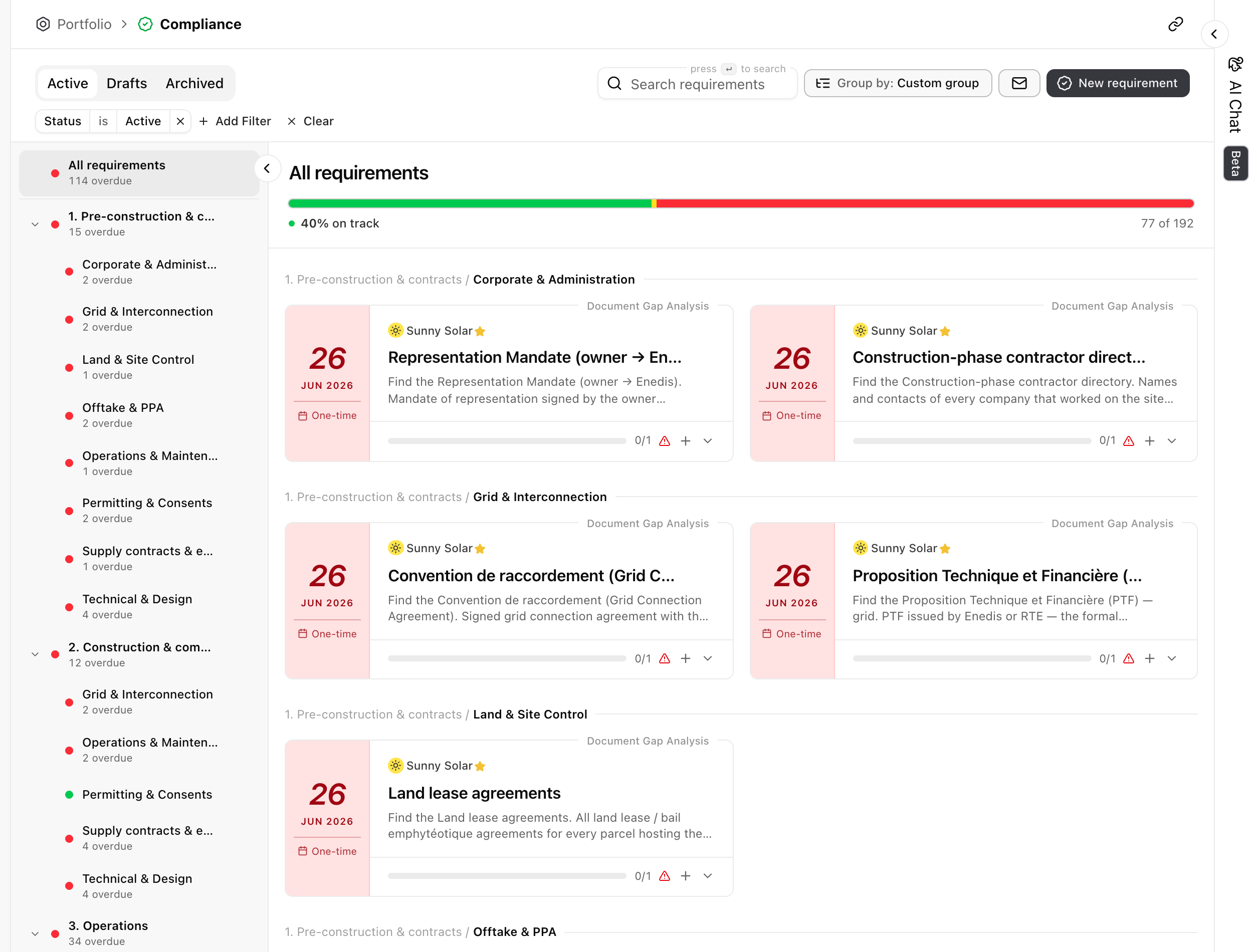
Section titled “Reading the page”Obligations are grouped by lifecycle phase (pre-construction, construction, operations) and by category within each (grid, offtake, permitting, and so on). A health bar at the top shows how many are on track (for example, 40 percent on track, 77 of 192), and each group in the list carries its own overdue count, so you can see at a glance where the pressure is. The tabs separate Active obligations from Drafts and Archived, and you can search, filter, and regroup the list.
Anatomy of an obligation
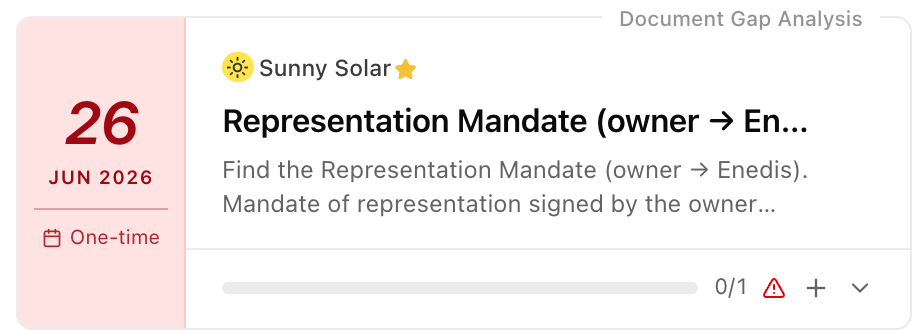
Section titled “Anatomy of an obligation”Each obligation is a card. It names the asset it belongs to and what is required, and around that it carries the three things you check at a glance:
 123
123- Due date and cadence. When it is due, and how often it repeats. This one is one-time; a recurring obligation shows the schedule its contract sets.
- How it is checked. The check Aevy runs to decide whether it is met, here a document gap analysis: is the required document present?
- Status. Met or not. A count with a warning, like 0 of 1, means the obligation is not yet met, which is a non-compliance.
Non-compliance
Section titled “Non-compliance”When an obligation is not met, it stands out. The card carries a warning, the item counts toward the overdue total on its group, and it pulls the on-track health bar down. So a non-compliance is never buried in a list: you see it on the obligation, on its category, and on the asset as a whole, which is exactly where you would look to judge your exposure.