Asset information onboarding
Your first job in Aevy is not data entry. Aevy has read the data room and already knows most of what there is to know about the asset. What you do is go through it: each value, the document it came from, and whether you agree.
Aevy needs the data room on the asset before it can read anything out of it. Breadth matters more than tidiness. Then comes getting to know your documentation.
Review a value
Section titled “Review a value”Take Laminar Wind, a four turbine site in Trøndelag. Nobody typed its commissioning date in. Aevy found it on page one of the annual financial summary and proposed it, and the review is one decision.
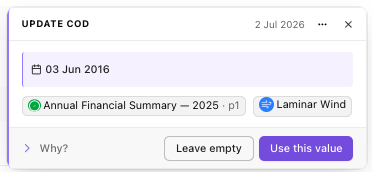
That is the whole shape of step one, repeated: capacity, commissioning date, technology and model, ownership, grid connection. Each proposal names its source, so a value somebody disputes a year later is traceable rather than assumed. Why? opens the reasoning when the answer is not obvious from the document alone.
Accepted values appear in the asset’s Asset details section, covered in the asset overview guide. Nothing is written until you accept it.
Add the fields you actually track
Section titled “Add the fields you actually track”Asset details has the fields every asset has. Most teams track more, and rarely the same ones: a lender’s reference, an internal site code, the turbine platform.
Those are custom fields, and this is the moment to set them up. A field belongs to your organization rather than to one asset, so adding one puts it on every asset of that kind, and Aevy then proposes values for it out of the documents exactly as it does above. Fields nest into groups, so a long list reads as sections rather than as a wall.
The practical move: bring the columns of whatever spreadsheet your team keeps alongside Aevy today. That spreadsheet exists because something was missing, and its columns are the fields to add. Ask your Aevy contact, or add them from Settings if you administer your organization.
Limits
Section titled “Limits”Aevy proposes only what the documents support. A thin data room gives a thin record, and the answer is more documents rather than more processing.
A value you leave empty stays empty. It is not a gap Aevy keeps arguing about, so if you leave one open on purpose, note why somewhere your team will look.
What’s next
Section titled “What’s next”- Getting to know your documentation: step two. Which agreements govern the asset, and who they involve.
- Asset overview: where the accepted values and your custom fields are read.
- Suggestions: the review queue these proposals sit in.