Bulk updates
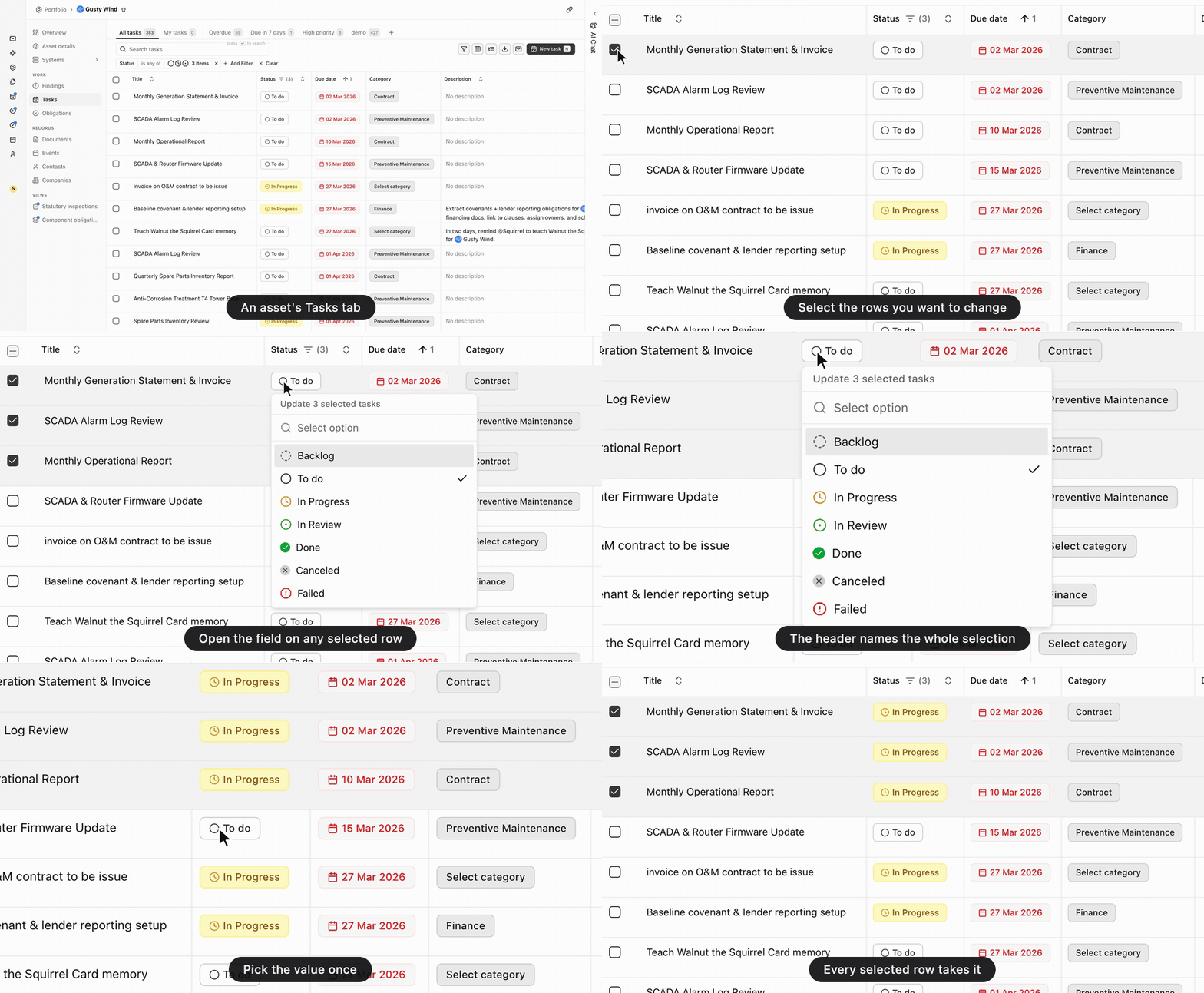
A bulk update sets one field on many records in a single action. Select rows in the Tasks, Findings, or Events table, then change a value on any one of the selected rows. Every other selected row takes the same value. There is no separate bulk-update screen: the cell you would edit anyway becomes the editor for the whole selection.
There is no undo. A bulk update writes the value to every selected record the moment you choose the value; there is no confirmation step. To reverse one, select the same rows and set the field again; each record’s activity feed shows the value it held before.
Anatomy
Section titled “Anatomy”The three work tables have the checkbox column that starts a bulk update: Tasks, Findings, and Events, on their own pages and on an asset. A bar floats over the bottom of the table for as long as you have something selected, counting the rows.
Select rows
Section titled “Select rows”Each row in those tables has a checkbox on the left, and clicking it puts the row in the selection. Four moves cover the rest:
- A range. Click one checkbox, then hold Shift and click another: every row between the two joins the selection, the way a spreadsheet extends a range. The row you clicked last becomes the anchor for the next Shift-click.
- Everything loaded. The checkbox in the header row takes all rows the table has. Cmd A, or Ctrl A on Windows, does the same from the keyboard.
- Clearing. Esc empties the selection, as does Clear selection on the bar. A header checkbox that’s only partly filled fills the rest when clicked, rather than clearing what you have.
- Reading the count. The floating bar reads “All” ahead of the number once every loaded row is in.
Selection reaches the rows the table has loaded, not every row your filter matches, so narrow the list before you select. Use the filter bar: filter to one asset and one status, and the selection you make is already the set you meant.
Update the selected rows
Section titled “Update the selected rows”With rows selected, open the field you want to change on any one of them, exactly as you would to edit that row alone. The picker shows you it’s about to act on more than one record: its header reads “Update 12 selected tasks” for a selection of twelve. Choose the value and it writes to every selected row at once, then a confirmation names how many rows it updated.
Which fields you can set this way depends on the record:
| Tasks | Status, priority, assignee, escalation assignee, category, contact, system, component, due date, start date. |
| Findings | Status, severity, finding type, category, assignee, reported by, responsible company, system, component, detected date, resolved date. |
| Events | Status, priority, event type, category, assignee, reported by, system, component, start date, end date, resolved date. |
To set a status and an assignee across the same rows, run two updates against the same selection. The selection survives the first write.
Limits
Section titled “Limits”One bulk update sets one field, and reaches at most 100 records. Select more than that, and the picker header says so and names the cap instead of offering values. Aevy writes nothing until you cut the selection down.
The confirmation reports what actually changed, counting skipped records separately whenever the number written falls short of the number you selected. Aevy skips a record when it’s no longer reachable: deleted while your list was open, or outside the assets you have access to. The rest of the update still goes through.
Documents, Contacts, and Systems have no checkbox column, so there is nothing to bulk update there.
What’s next
Section titled “What’s next”- Filtering tables: narrow the list first, so the rows you select are the rows you meant.
- Suggestions: their own case, where Accept all takes a whole group of proposals in one decision.
- Tasks: the fields a bulk update sets, one record at a time.